
Start with the detection objective
A useful assessment starts with a clear basis: the areas requiring detection, the hazards of interest, detector types, coverage targets and voting requirements. These decisions guide the model and calculations. A coverage percentage is meaningful only when read alongside that basis.
The study supports engineering decisions about detector locations and orientations. It does not, on its own, establish the overall effectiveness or reliability of a fire and gas safety system.
Use the plant model to understand the layout
Equipment, structures and elevations provide the context for placing detectors and defining assessment zones. Model scope, level of detail and coordinate alignment should be checked before calculation.
safe3D supports 3D DWF geometry exported from Autodesk Navisworks, together with GLB, glTF, OBJ and STL. An NWD model is first opened in Navisworks Manage or Simulate and exported as 3D DWF; NWD is not listed here as a direct import format.
Assess flame and gas coverage appropriately
Flame detector mapping
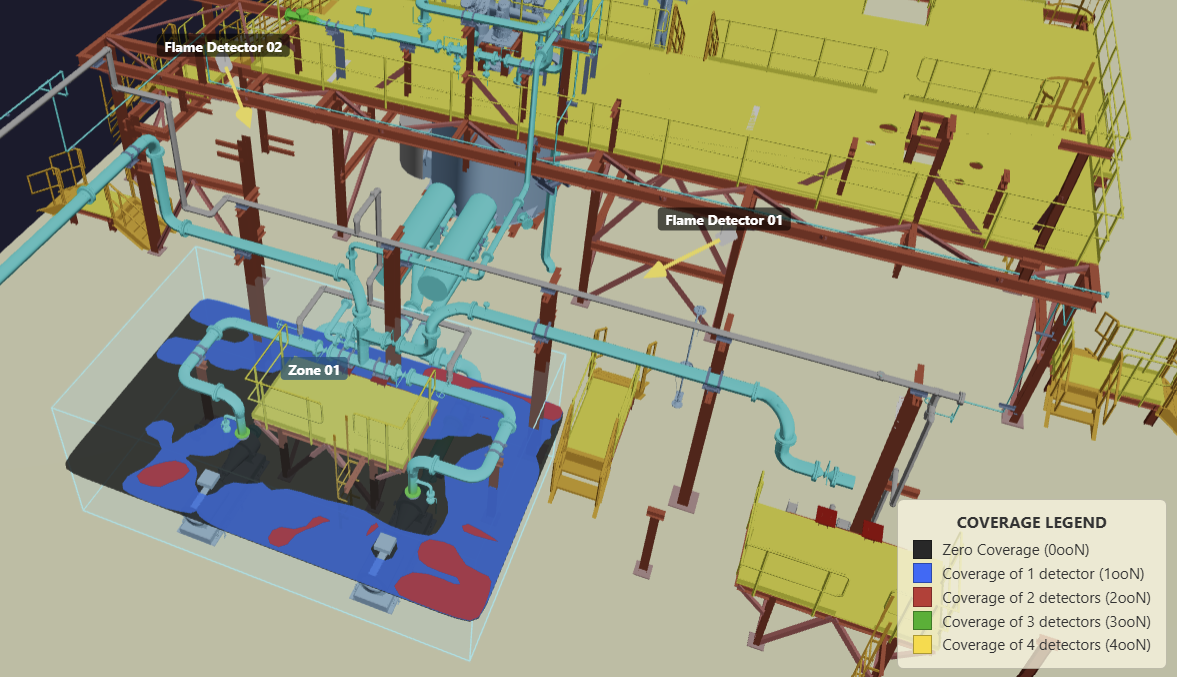
Flame detector coverage depends on detector position, orientation, detection range and field of view. Obstruction checks use the imported geometry to assess line of sight. This helps reveal gaps behind equipment that may be difficult to recognise in a plan view.
Gas detector mapping
Point and open path gas assessments use the configured detector characteristics, gas cloud assumptions, alarm settings and selected voting logic. This is a coverage assessment of those assumptions, not a simulation of how a release disperses through the plant.
Define zones and review coverage
Zones establish the spatial scope of each assessment. Review each zone against its applicable target and study settings. Where exclusions are used, document what has been excluded and why.
Volumetric coverage examines the eligible assessment volume. Geographic coverage considers the defined spatial assessment area. Both require a clear definition of the region and detection criteria being evaluated.
Compare layouts and document the result
- Record the baseline detector layout and assessment settings.
- Inspect numerical coverage together with 2D contours and 3D views.
- Adjust the layout in the desktop software and recalculate using consistent settings.
- Compare coverage, gaps and overlap, then document the assumptions behind the selected layout.
Keep the model revision, detector settings, zone definitions, coordinate reference and calculation resolution with the results. A later geometry or layout change may require a new assessment.
Review a saved study with others
The browser viewer lets reviewers open a shared native safe3D study and inspect the available saved setup and results. Study files are opened locally in the browser. Calculation and editing remain in the desktop software.
See the safe3D study workflow for the model import, detector setup, calculation and reporting stages.